Built by a physio, for physiotherapists

Premium physiotherapy practice management software.

Online appointment booking, patient records, treatment notes, GST billing and WhatsApp reminders in one secure place, on your phone or the clinic computer. Designed by a physiotherapist, so it works the way your day does.

Free for the first six months. No card details required.

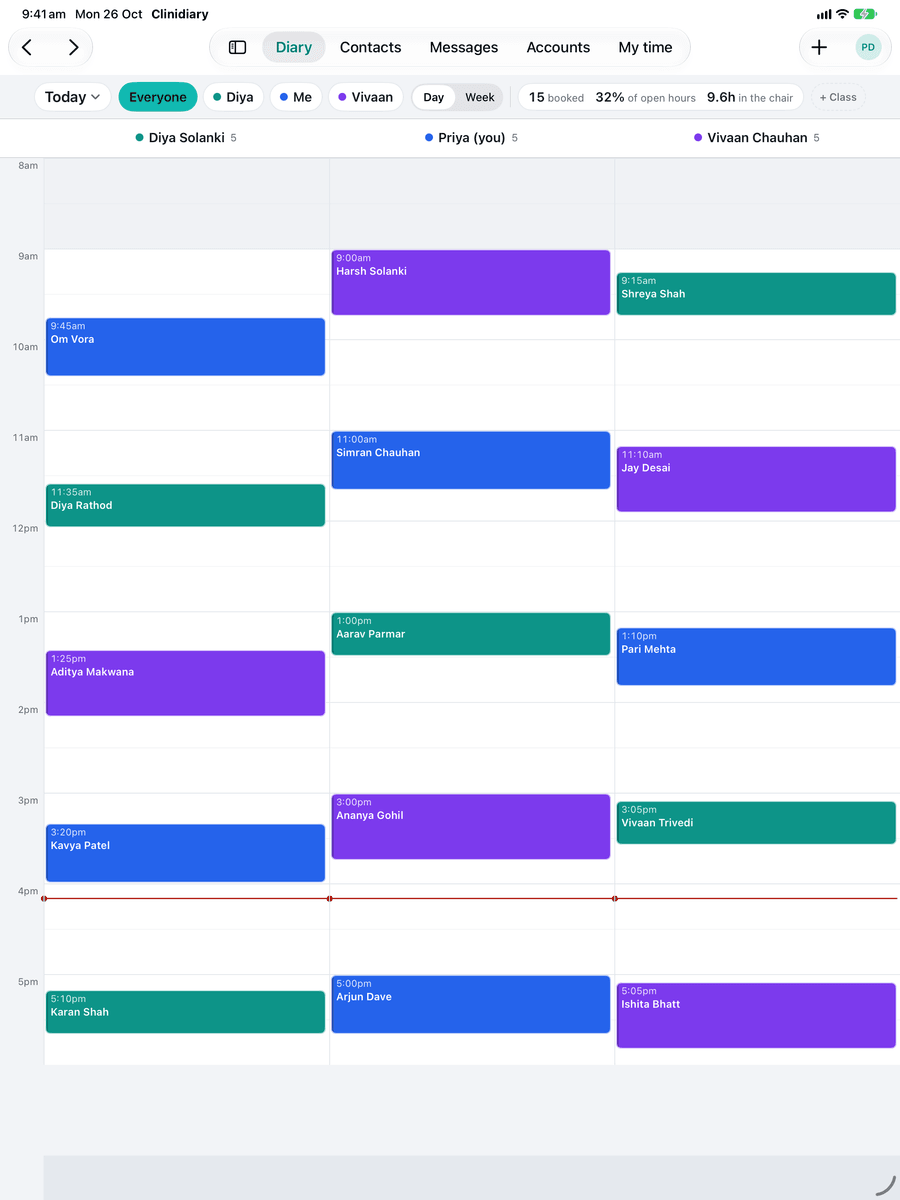
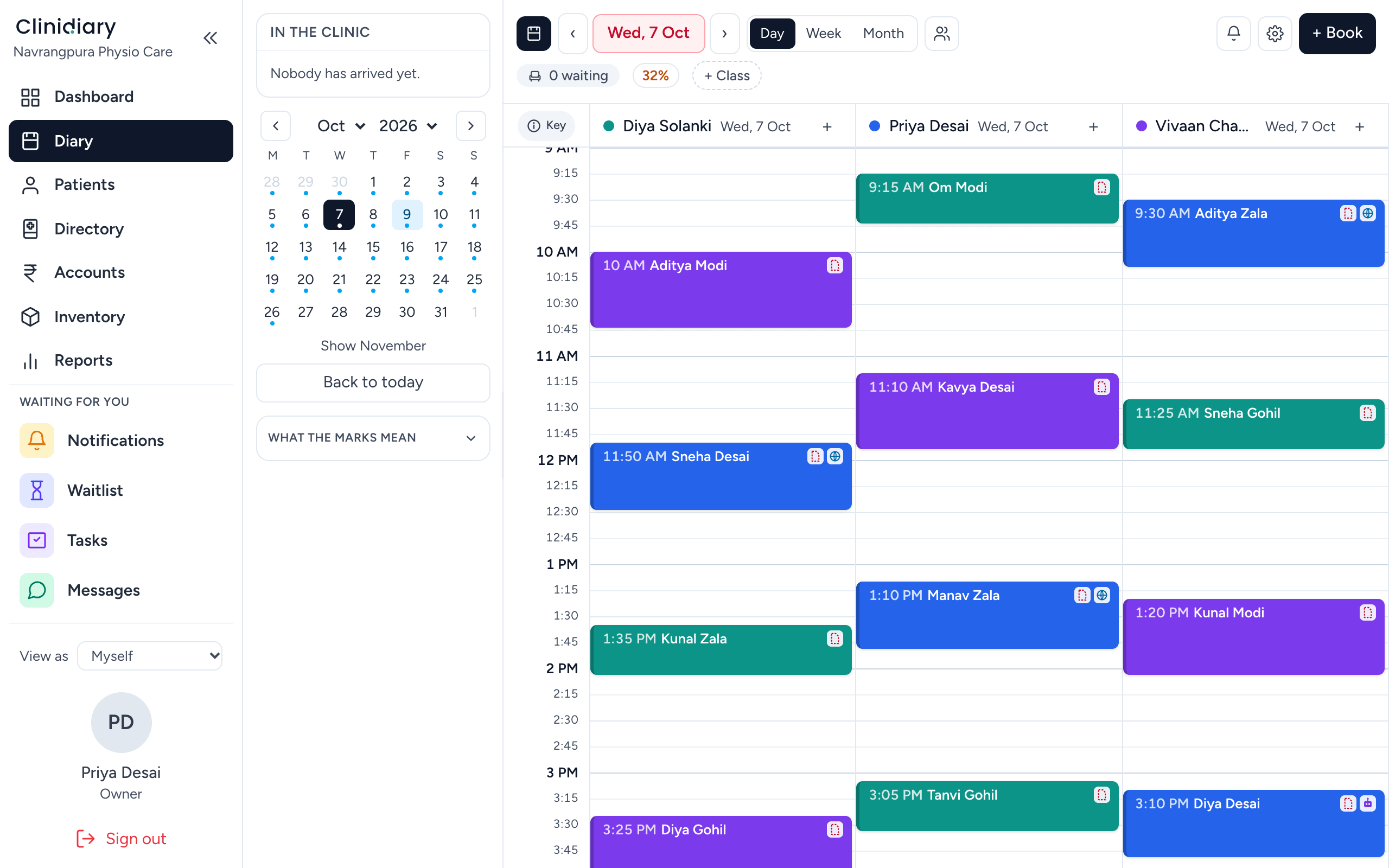
The Clinidiary diary for Wednesday 7 October at a test clinic in Ahmedabad: three physiotherapists' columns side by side with the day's appointments, a month calendar, and who is in the clinic.
The diary. A test clinic with invented patients — the real thing otherwise.
  • Unlimited free supportHelp by chat and email whenever you need it, included for every clinic.
  • Secure by designEncrypted connections, passkey sign-in and a trail on every record. Privacy comes first.
  • Six months freeThe whole workspace and every feature, from your first day.
Built by a physio

Made by a physiotherapist, for physiotherapists

Clinidiary is designed by a physiotherapist, so every screen starts from how physios actually work: the assessment, the treatment plan, the follow-ups and the bill. Premium software with every feature included, from ₹250 a month for each physio, paid yearly, plus GST.

See pricing
  • Notes the way you assess

    SOAP notes with body charts and pain scales, or templates you design yourself.

  • Progress you can show

    Goals and outcome measures, charted visit by visit so patients see how far they have come.

  • Made for how Indian physios work

    Morning OPD, home visits with their travel on the diary, session packages and group classes.

What it does

Everything you need to run your clinic, in one place

Booking and scheduling

Appointment booking for every physiotherapist, every clinic and the home-visit run

Day, week or month, by room or by person. Patients book online and the time is held while they type; a waiting list refills cancellations on its own.

  • Online booking with a link for each clinic, and rules on what may be booked
  • Home visits in order, with the travel time between houses
  • A waiting list that fills cancellations, and classes with a roll
  • Arrived, note, bill, paid — marked on the booking, so the whole room sees it at a glance
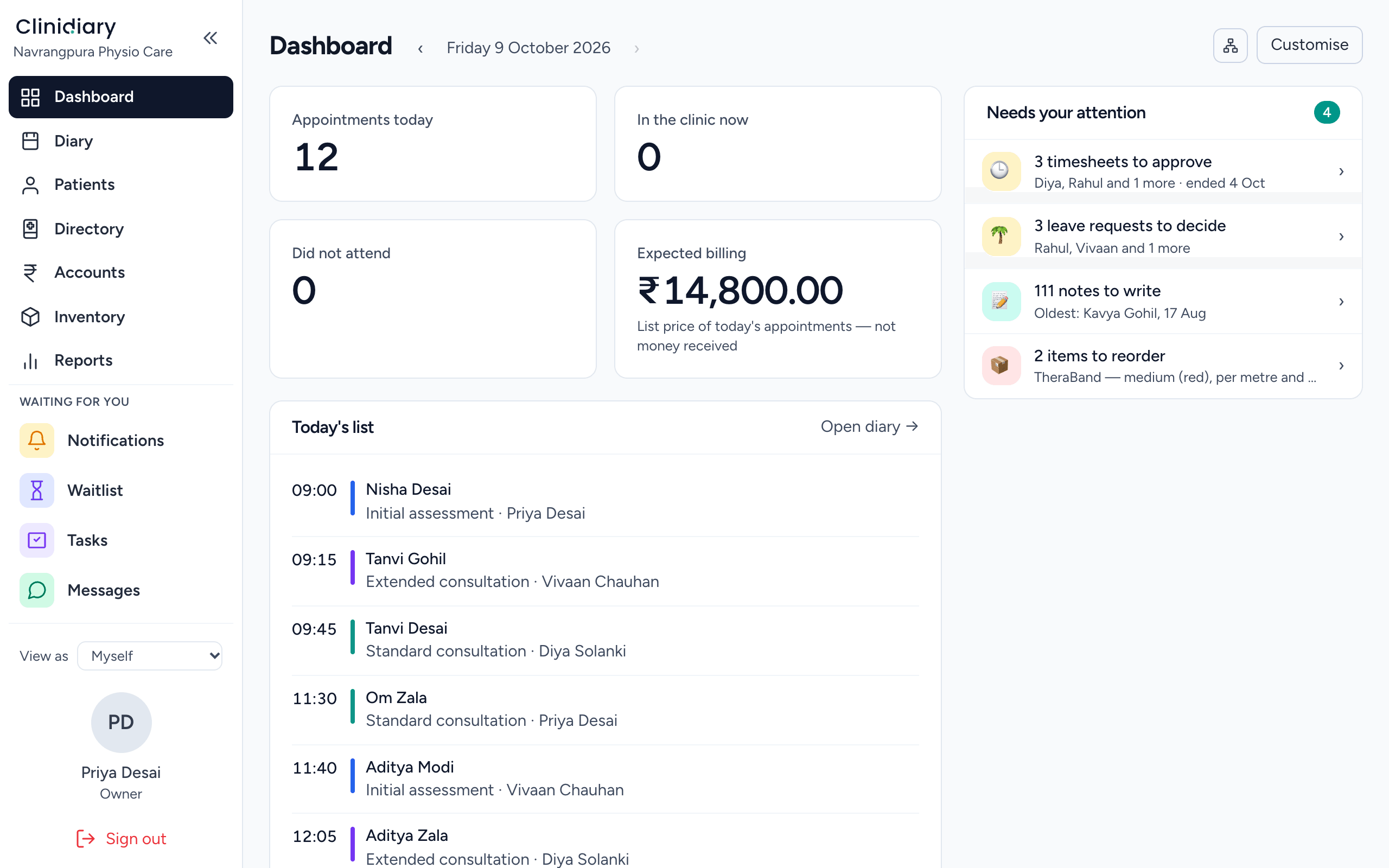
Everything in the diary
The Clinidiary dashboard at a test clinic: twelve appointments today, ₹14,800 of expected billing, today's list by time and physiotherapist, and a 'needs your attention' column of timesheets, leave requests, notes to write and stock to reorder.
Treatment notes

Treatment notes that save as you type and lock once signed

Templates for the initial assessment, SOAP notes, progress notes, telehealth and discharge. A note keeps a copy on the phone if the network drops, and a correction after signing is kept as an addendum, so the signed note always stands.

  • Forms sent online, or printed on your letterhead for the patient who prefers paper
  • Outcome measures tracked over time, and goals on the case
  • Letters and referrals on the record, addressed to the patient's own doctors first
  • Duplicate patients found and merged
What is in the record
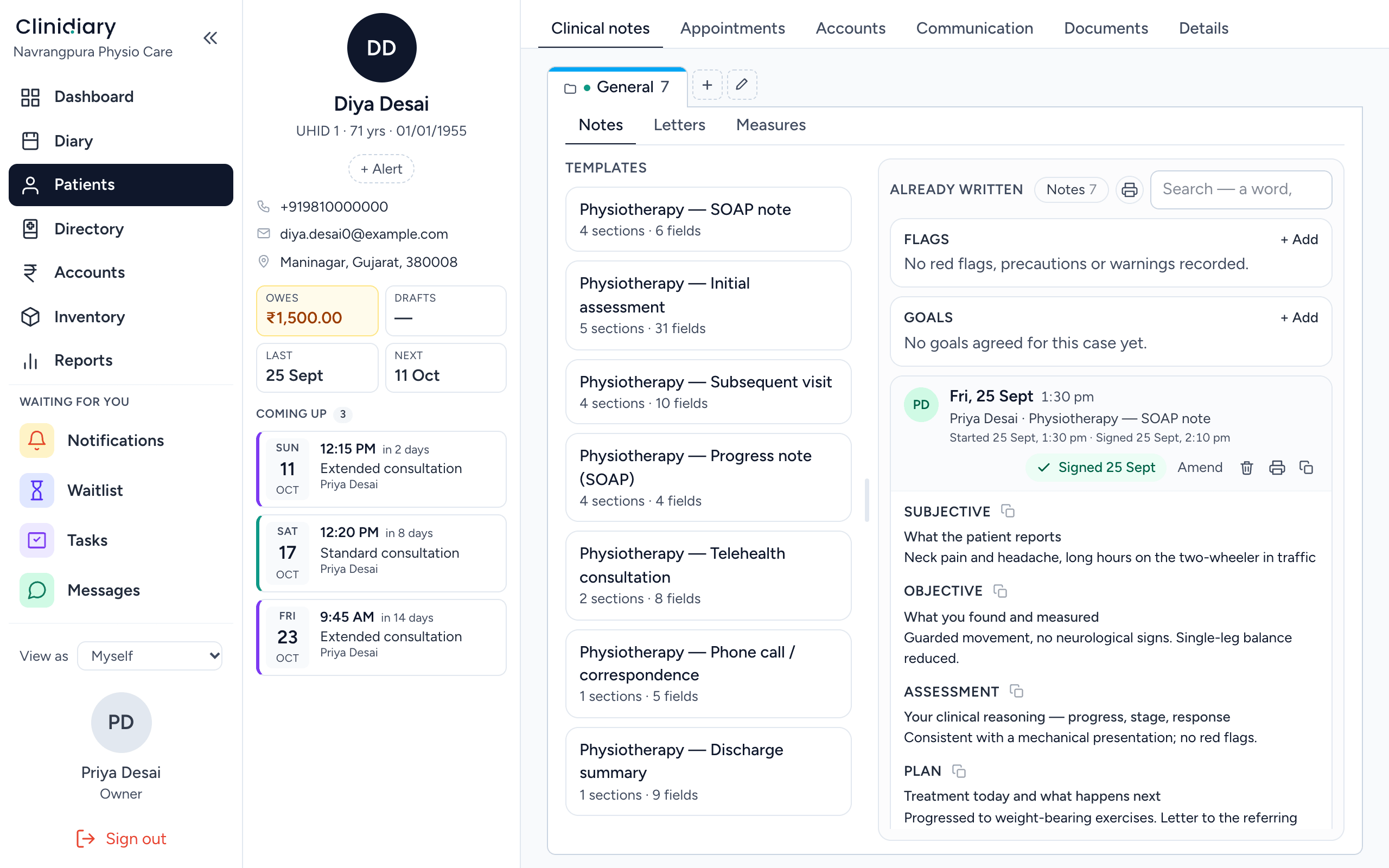
A patient's clinical notes in Clinidiary: physiotherapy templates for a SOAP note, initial assessment, subsequent visit, progress note, telehealth and discharge on the left, and a signed SOAP note on the right with subjective, objective, assessment and plan sections.
GST billing and payments

A proper GST bill in one tap, with UPI, cash and card

The bill comes straight from the booking and carries your GSTIN. How a patient pays is recorded exactly: cash at the desk, UPI from the sofa, or a session package bought up front, each behaves as what it is. A paid bill stays exactly as paid.

  • Bills that carry your GSTIN, with GST handled per line
  • Cash, UPI and card, and one bill split across UPI and cash in seconds
  • Session packages sold up front and counted down visit by visit
  • Mediclaim patients flagged on the record
How billing works
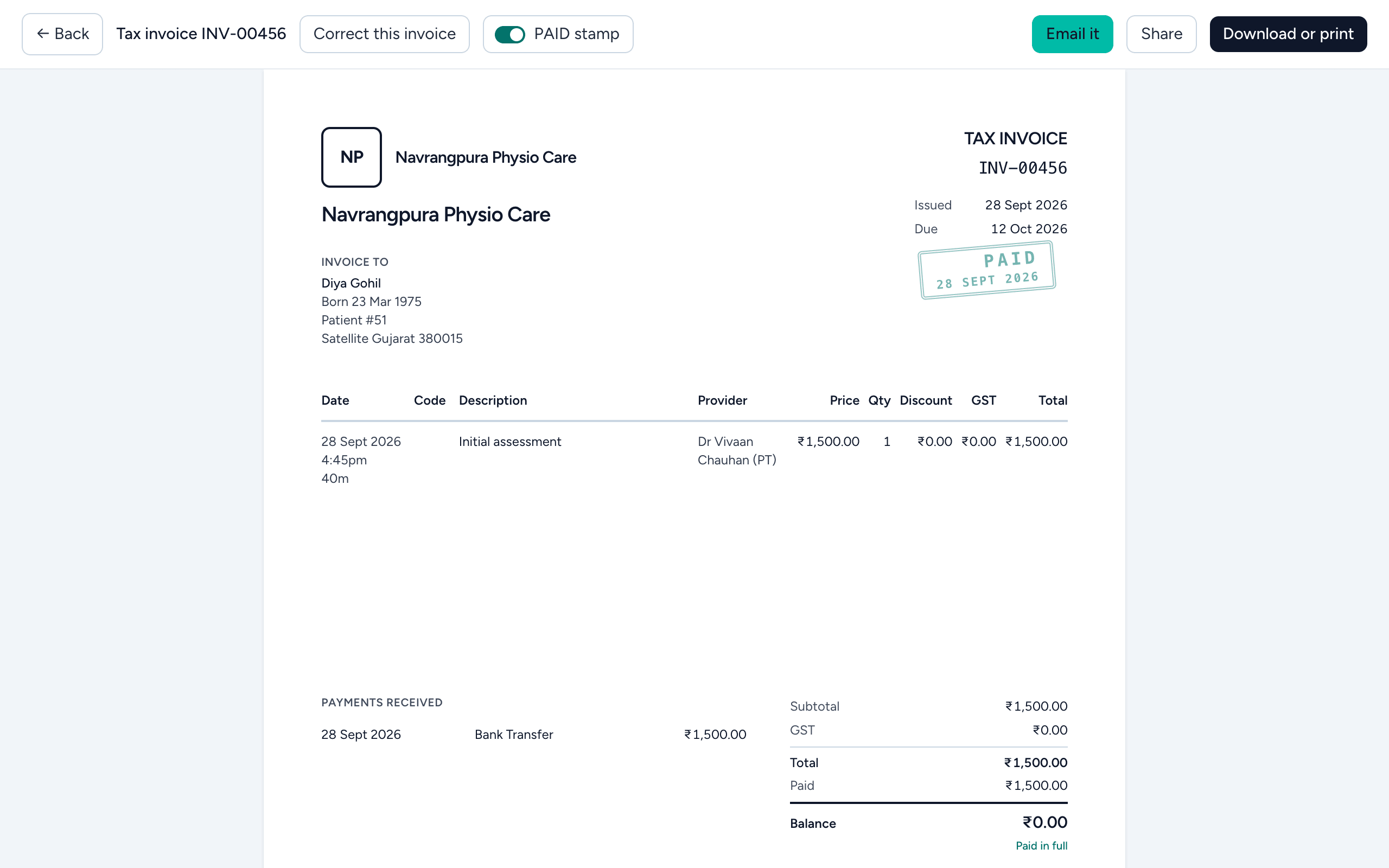
A Clinidiary tax invoice from a test clinic: an initial assessment for ₹1,500 with the physiotherapist named on the line, GST shown per line, the payment received, a PAID stamp and a balance of ₹0.
WhatsApp reminders

Appointment reminders on WhatsApp, and letters to referring doctors

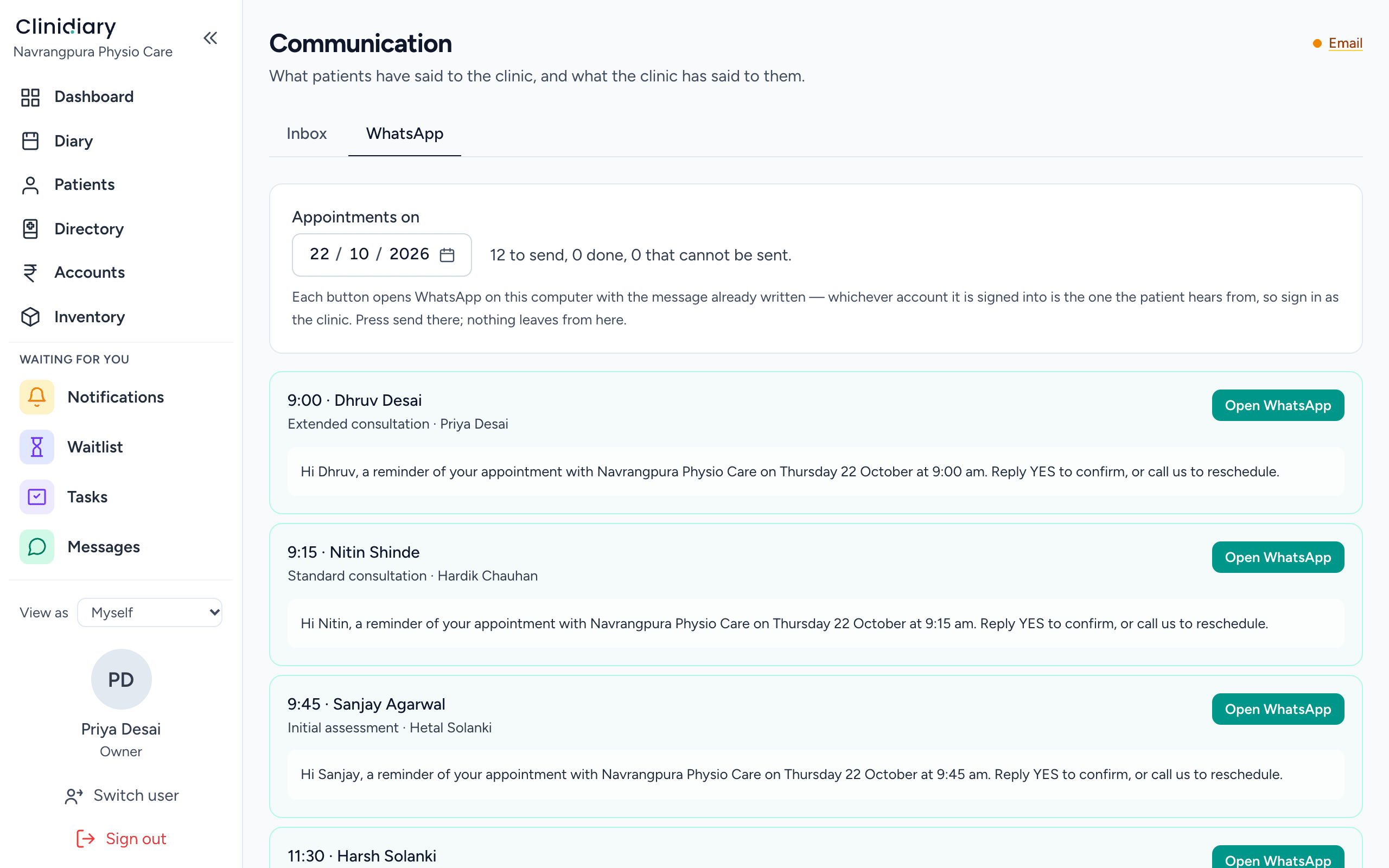
Each day's reminders are already written. One tap opens WhatsApp on your phone with the message ready, free for every message you send. Patients who prefer email get theirs by email.

  • WhatsApp reminders, written and ready to send
  • Reminders and recalls by email, set once
  • A directory of doctors, hospitals and insurers, with their numbers
  • Email with copies — a letter or bill to the patient and their doctor in one send
Reminders and recalls
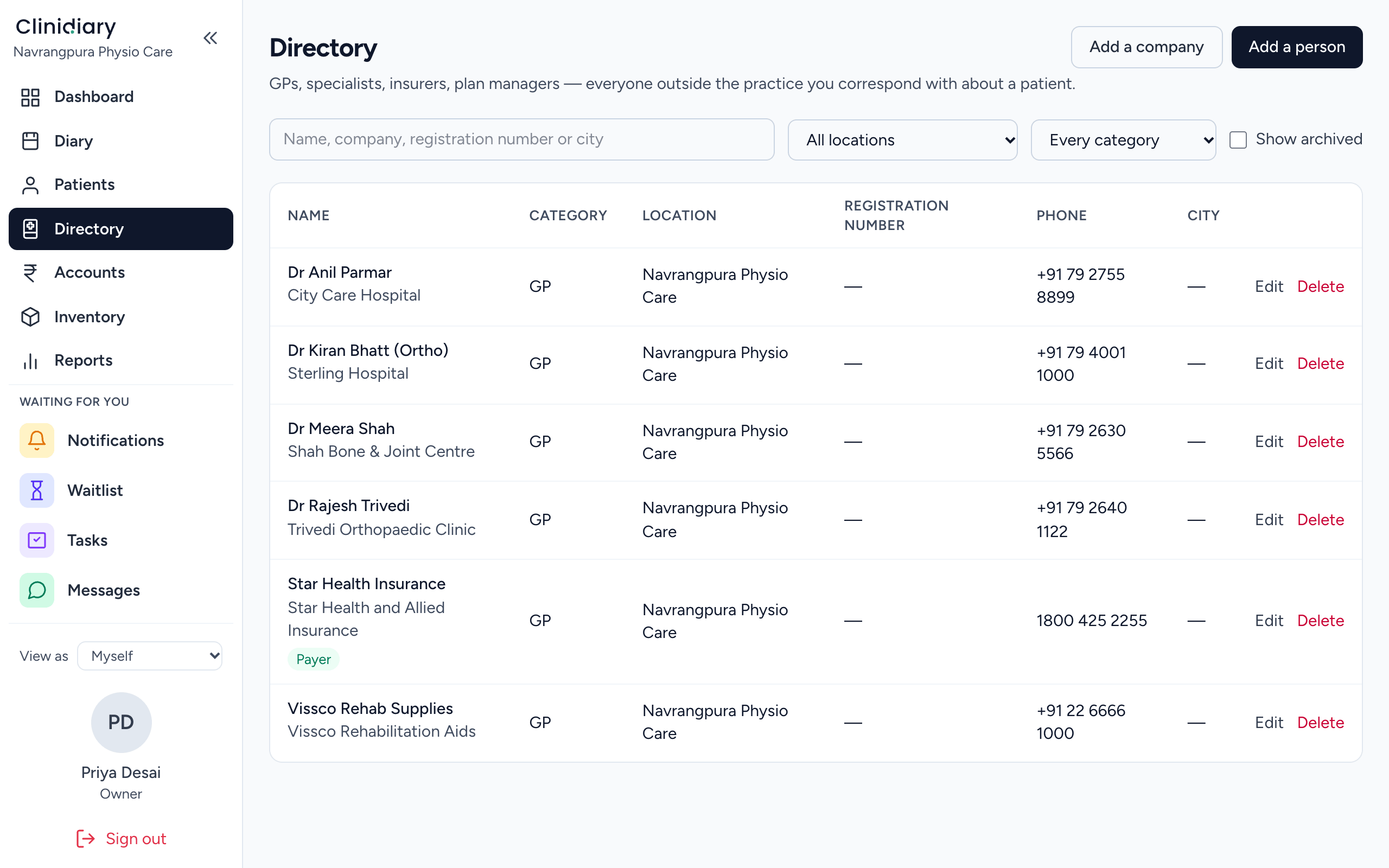
Clinidiary's Directory at a test clinic: referring doctors, hospitals and an orthopaedic clinic, an insurer marked as a payer, and a supplier, each with a phone number.
Reporting and analytics

Reports for any period and every physiotherapist, on one screen

Takings, visits and uncompleted notes by clinic and by physiotherapist, for any period, ready to print on your letterhead. An audit trail says who did what.

  • Practitioner scorecards and a print for each therapist
  • How patients paid — cash, UPI, card and packages — for any period
  • Roles and per-permission control — owner, manager, front desk, practitioner
  • Your data brought in from the software you are leaving
Running a practice
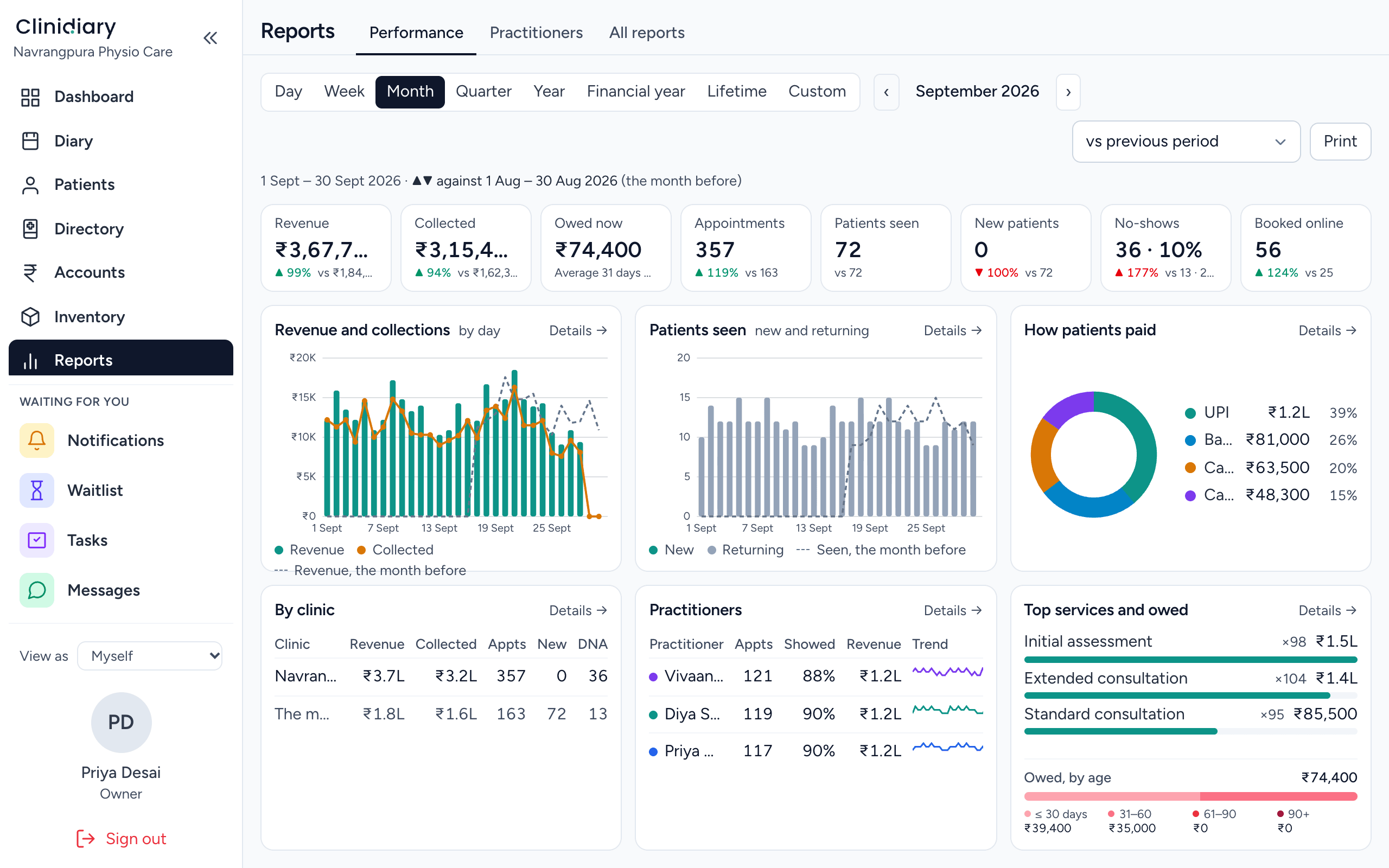
Clinidiary's Performance report for September 2026 at a test clinic: revenue, collected, owed, appointments, patients seen and booked online, charts of revenue by day and patients seen, how patients paid with UPI the largest share, and tables by clinic and by practitioner.
Make it yours

Your notes and your forms, built the way your clinic works

Design your own note templates and write your own consent and intake forms, in minutes and without calling anyone. Change them whenever the way you work changes.

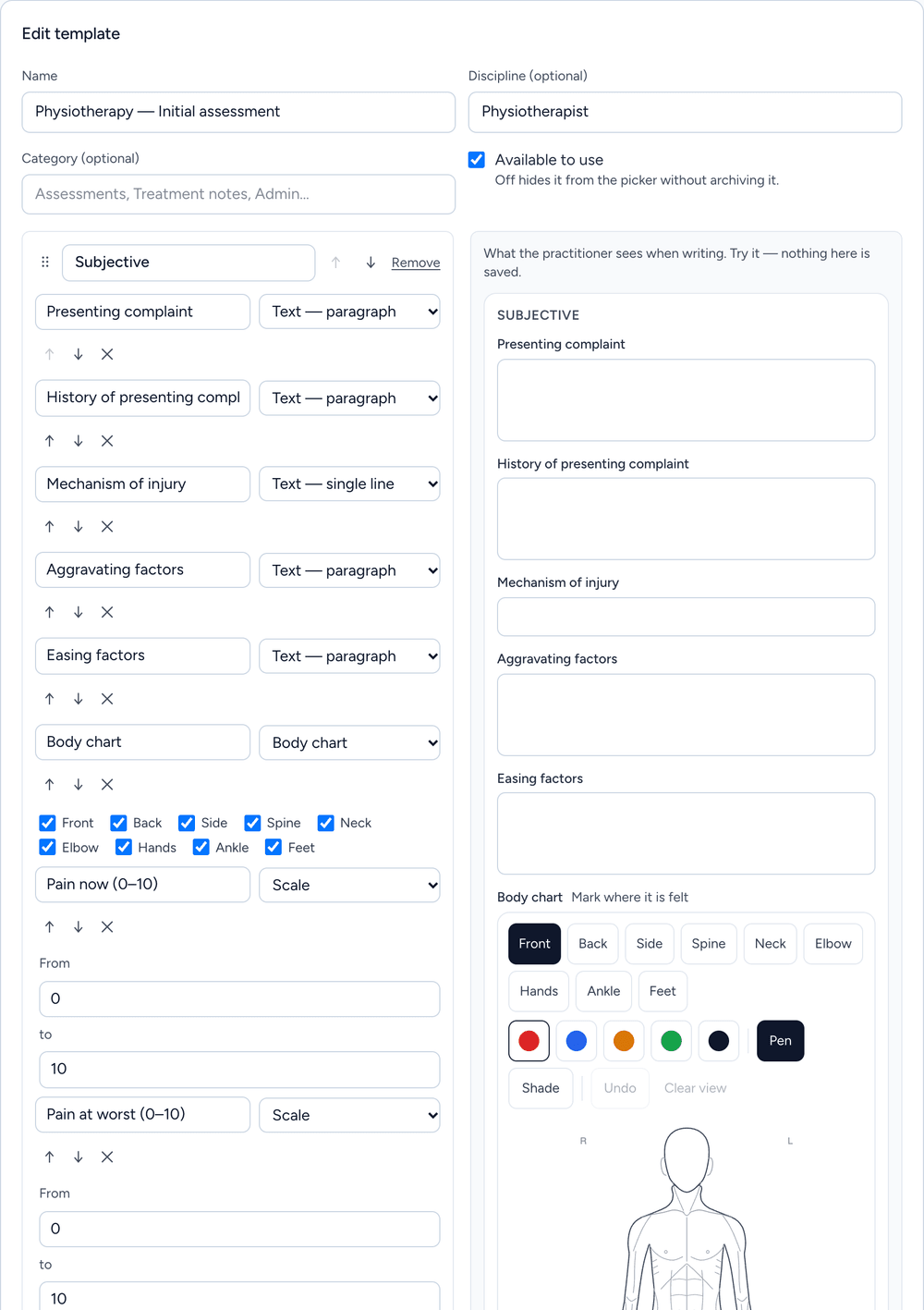
The note template editor in Clinidiary: an initial assessment template for physiotherapists, with its questions, a body chart and pain scales on the left, and on the right the note as the practitioner will see it when writing

Note templates you design

Start from a ready-made template for your discipline, or from a blank page. Add your own sections and questions, and see the note exactly as your physios will write it while you build.

  • Every kind of question: text, tick boxes, drop-downs, scales, numbers, dates and a body chart to draw on
  • One for each discipline and each site, so every practitioner opens the template that fits
  • Notes already written never change when you edit a template: each keeps the layout it was made with
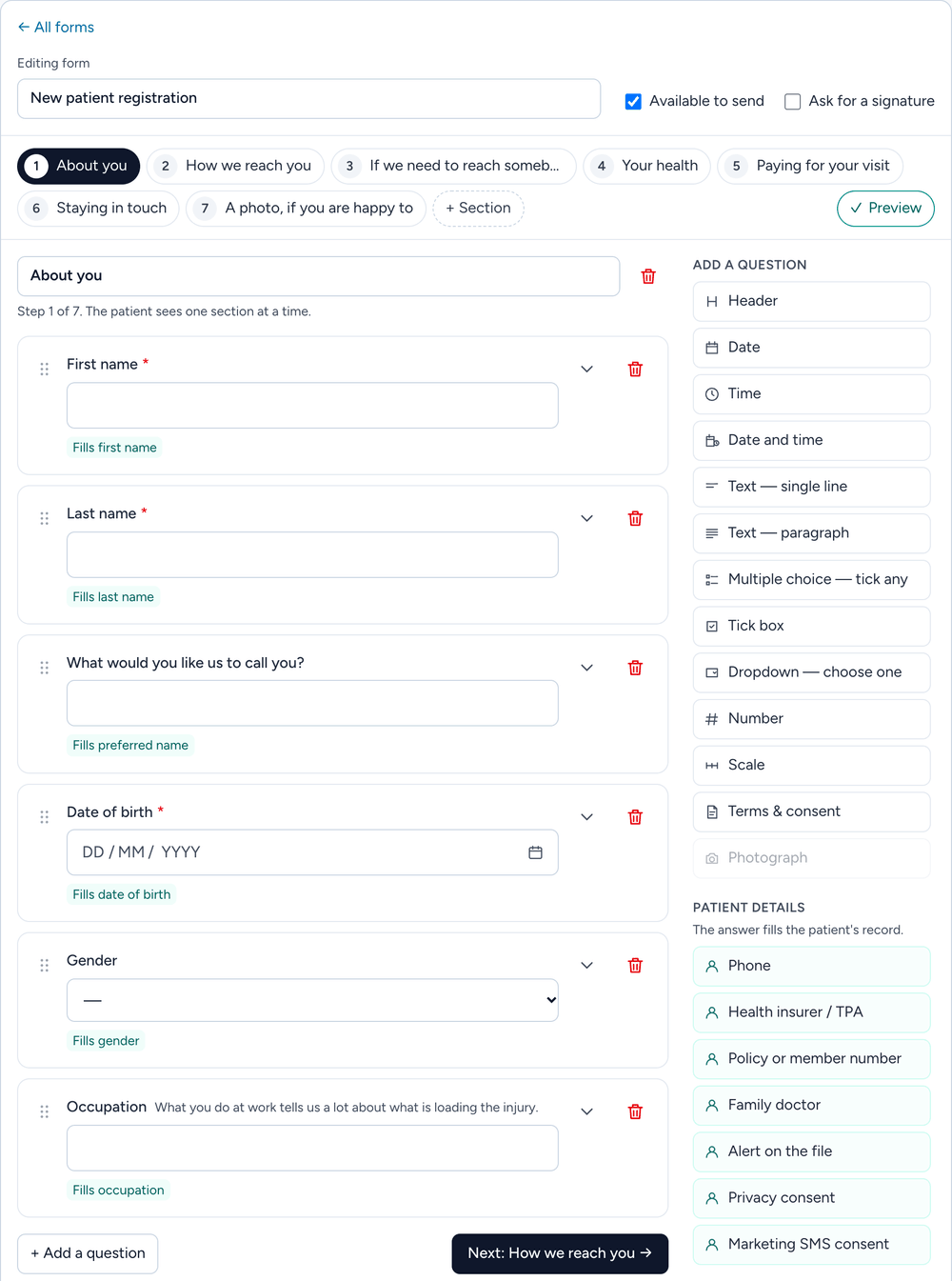
The form builder in Clinidiary: a new patient registration form in seven steps, its first questions on the left, and the questions that can be added on the right, including the ones whose answers fill the patient's record

Consent and intake forms in your words

Write your own consent, registration and screening forms, a step at a time, the way the patient will see them on their phone. Preview the form as the patient will before you send it.

  • Your own consent wording, with a tick box and a signature the patient draws
  • Answers that fill the patient's record: phone, health insurer or TPA, policy number and their family doctor
  • Anything that does not match the file is flagged when the desk reviews the form, so reception can put it right
Your team

Your whole team, talking in one place

Messages between colleagues are part of Clinidiary, beside the diary and the patient files. Reception, the physiotherapists and the owner stay in step where they already work, and work chat stays with the clinic.

  • Team messages

    One to one, or in groups such as Front desk. Only the people in a conversation can read it, and messages are stored encrypted.

  • Notices everyone sees

    Share news and photos on the team feed. Mark a post Important and it waits on everyone's dashboard until they press Got it.

  • Tasks and hand-overs

    "Call this patient back" goes to a person with a due date, and stays on the dashboard until it is done.

  • Attendance and leave

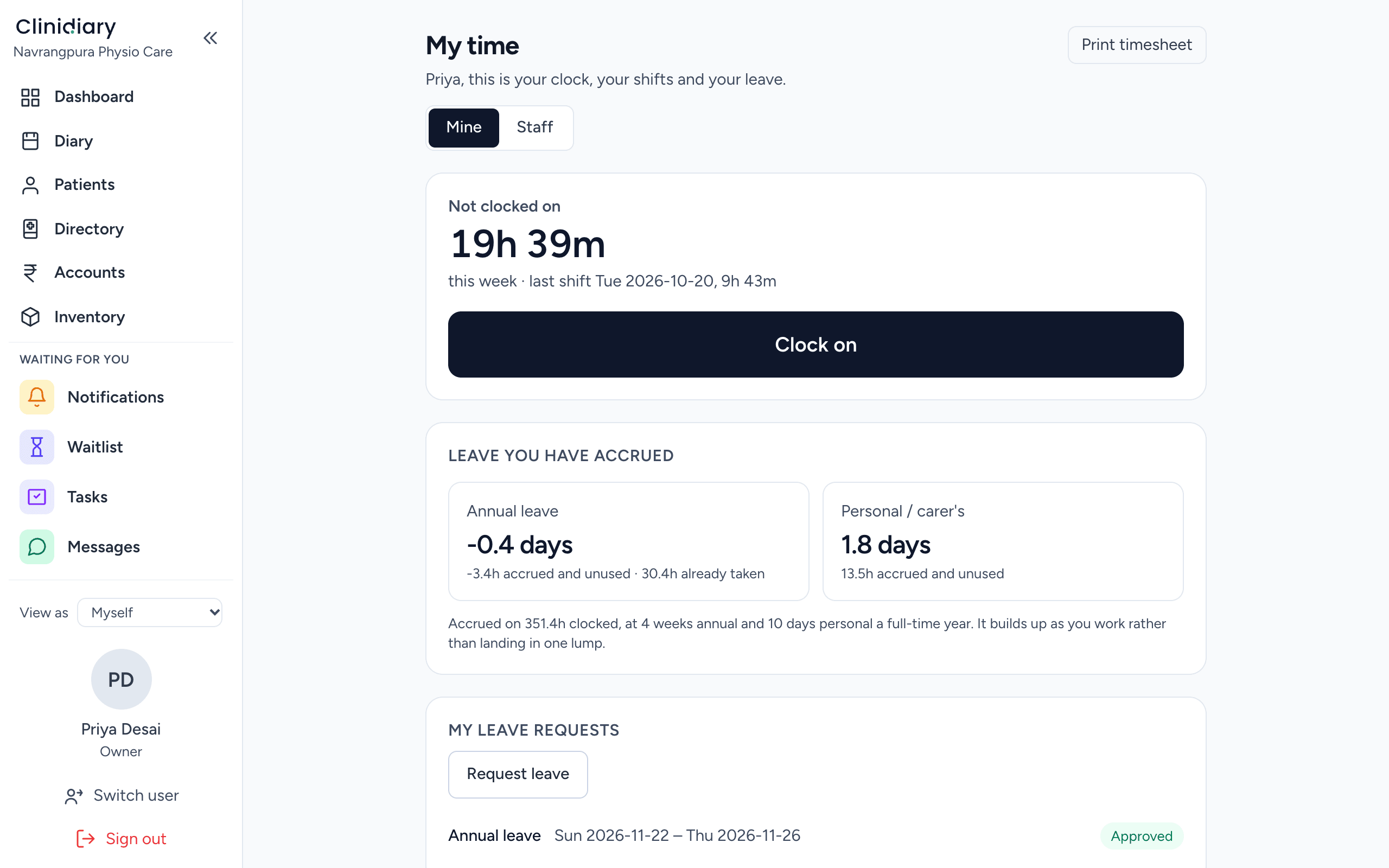
    Clock in and out, ask for leave, and approve each pay period's hours.

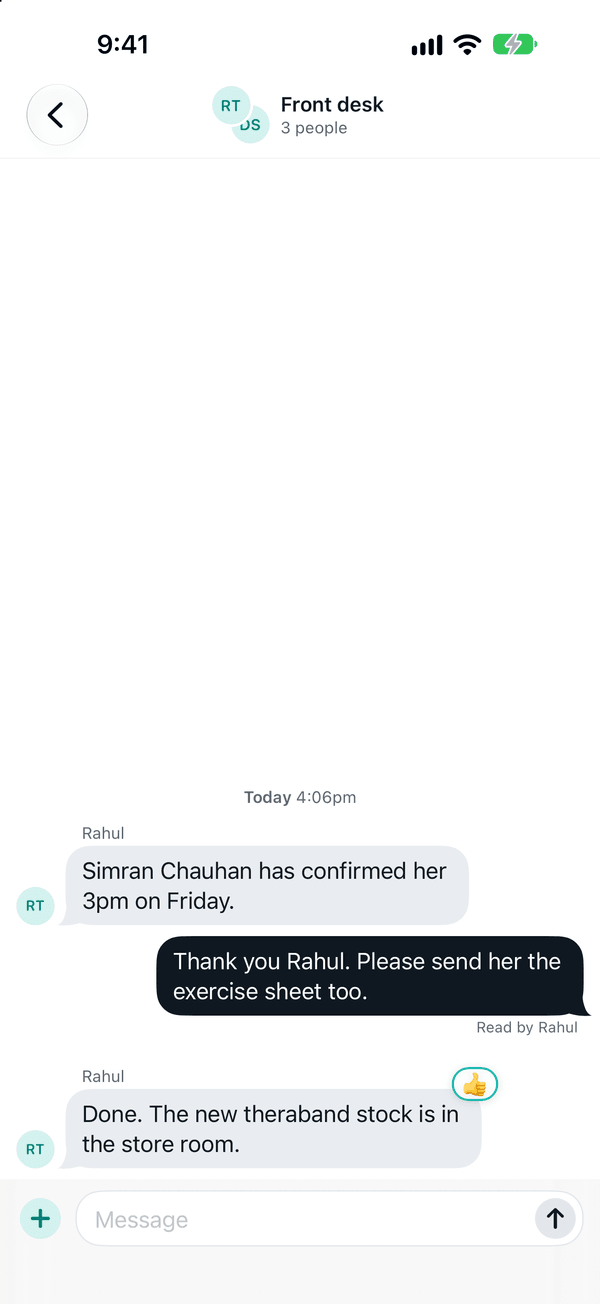
Everything about team messaging
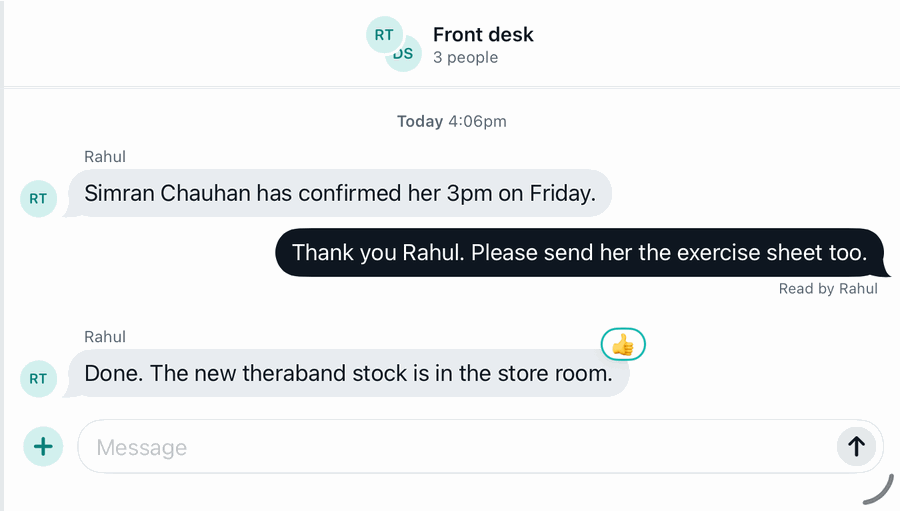
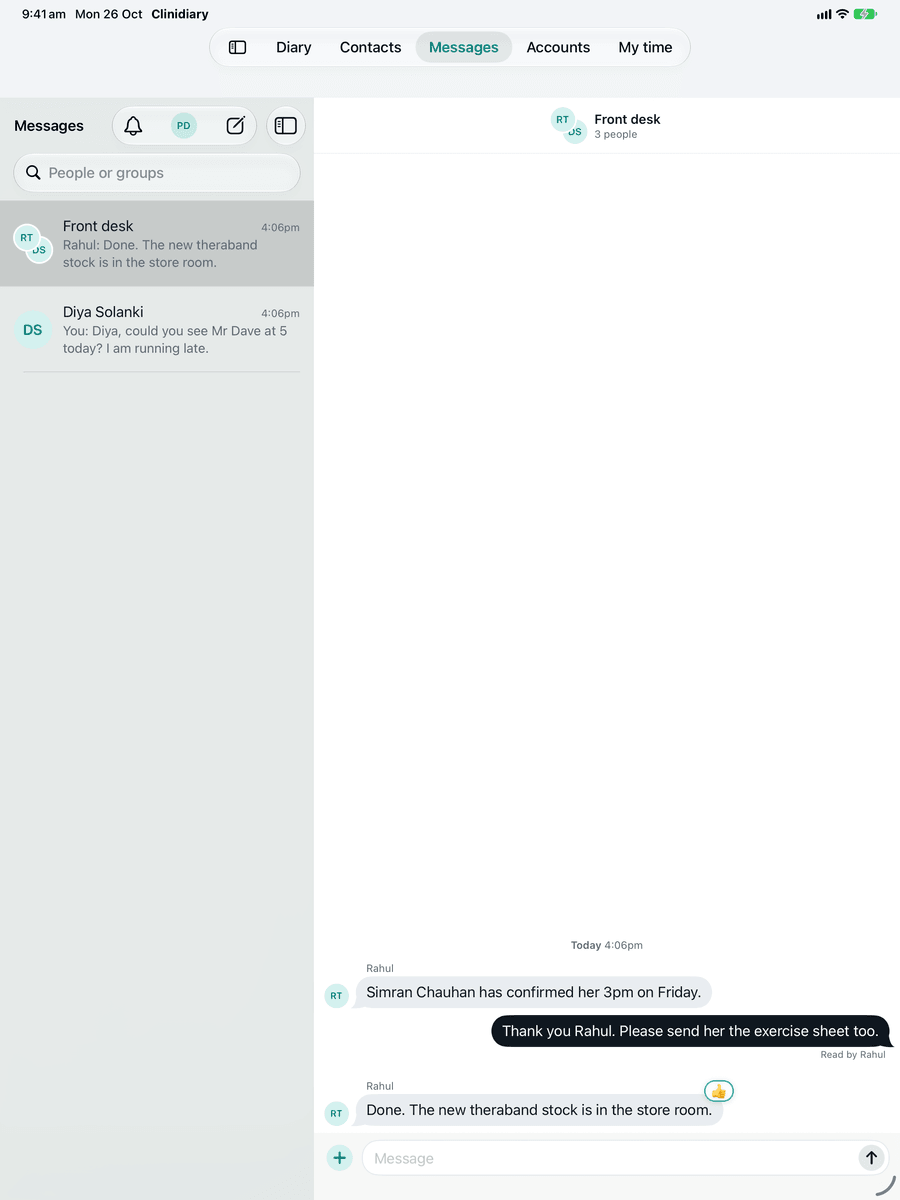
A Front desk group conversation in Clinidiary: colleagues passing on a late patient, new stock in the store room, and a reaction to a reminder
The Front desk group, from the Clinidiary app
Forms and paperwork

Paperwork that fills itself in

Patients fill in and sign their forms on their own phone before they arrive. What they write goes straight into their file, and the letters you write start with their details already in.

  • Consent, signed on their phone

    Email the form or share its link before the visit, or hand over a tablet at reception. The patient reads it, ticks and signs with a finger, and the signed form lands in their file.

  • Their details, straight into the file

    Name, date of birth, address, phone numbers and their doctor go from the patient's form onto their record. Nobody at reception types them in again.

  • Letters that start written

    The patient's name and date of birth, the doctor you are writing to and the visits so far are filled in. You write the clinical part.

  • Ready-made consent forms

    Consent to treatment, dry needling, telehealth and more, added in one click and changed to suit your clinic.

Everything about consent forms
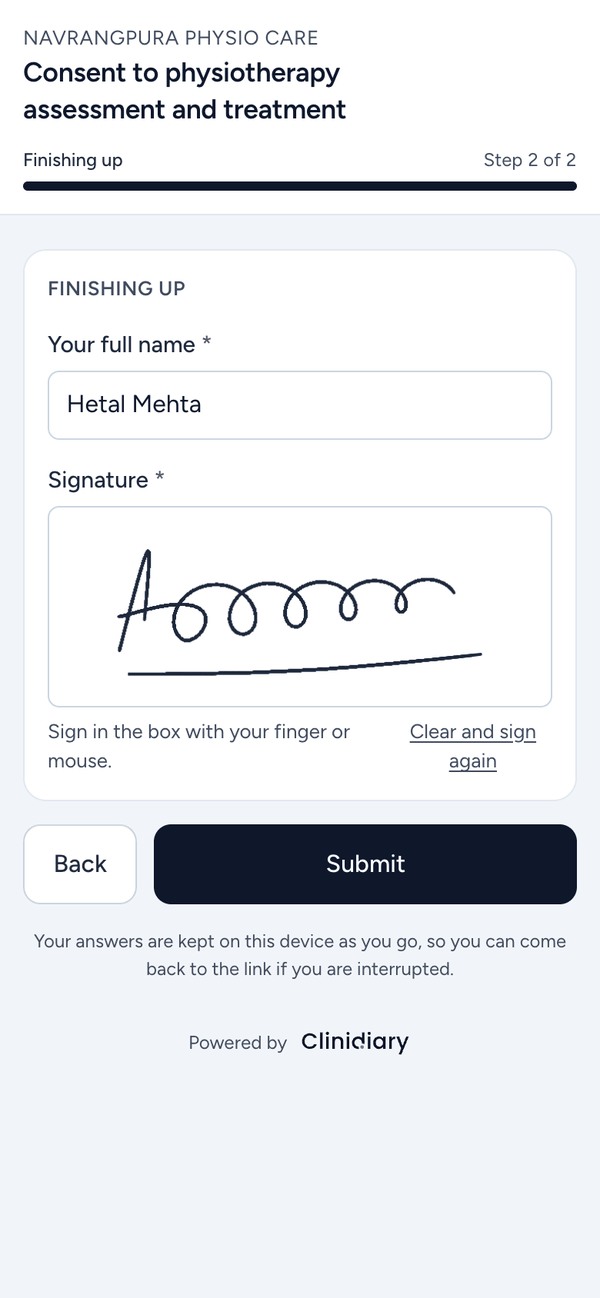
A Clinidiary consent form on a phone: Consent to physiotherapy assessment and treatment from Navrangpura Physio Care, with the patient's name typed in and a signature drawn with a finger, ready to submit
A consent form, signed on the patient's own phone
Classes

Group classes, from the timetable to the payment

Clinical Pilates, back care batches, knee OA groups or post-natal classes. Set the timetable up once, book people into the whole batch in one go, and see on the roll who came and who has paid.

  • A whole term's timetable in one go

    Choose the weekdays, weekly or every few weeks, for a number of classes or until a date. Every date is listed before anything is made, with clashes and public holidays marked, so you can leave any out.

  • The whole batch booked in one step

    Book someone into this class, the rest of the batch or the dates they pick, at their own price for a concession or a free trial. When a place frees up, the next person on the waiting list gets it.

  • A roll that shows who has paid

    Mark people as arrived, take payment at the desk by cash, UPI or card, use a class pass or sell one, email the whole class and print the roll.

  • Booked online, reminded on WhatsApp

    Patients pick a class on your online booking page and see how many places are left. Each place is on the day’s WhatsApp reminder list, ready to send in one tap.

Everything about classes
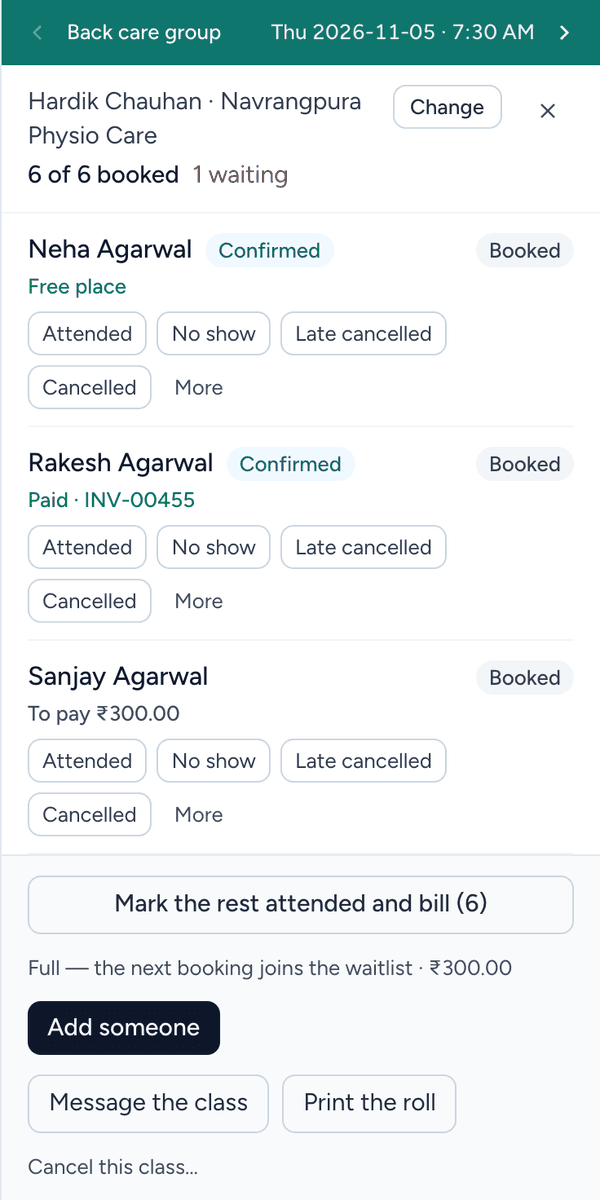
The roll for a Back care group in Clinidiary on Thursday at 7:30 AM: six of six places booked and one waiting. Neha Agarwal has a free place, Rakesh Agarwal has paid on invoice INV-00455 and Sanjay Agarwal has ₹300.00 to pay, with buttons to mark attendance, add someone, message the class and print the roll
A Back care group roll, from Clinidiary

Packed with everything a clinic needs

Every part of the clinic day, in one place.

And much more

Patient portalForms online or on paperStock and retailLetters and templatesVideo consultationsDiary in your calendarRepeat bookingsClasses
See every feature
Coming soon

Your clinic in your pocket

Clinidiary apps for iPhone, iPad and Android are on the way. The diary, your patients and your notes, wherever you are.

  • Today's diary and every patient's file
  • Notes that save themselves as you type
  • Book, move and cancel appointments
  • Team messages and notifications
  • Clock on and off, and ask for leave
Coming sooniPhone & iPad Coming soonAndroid
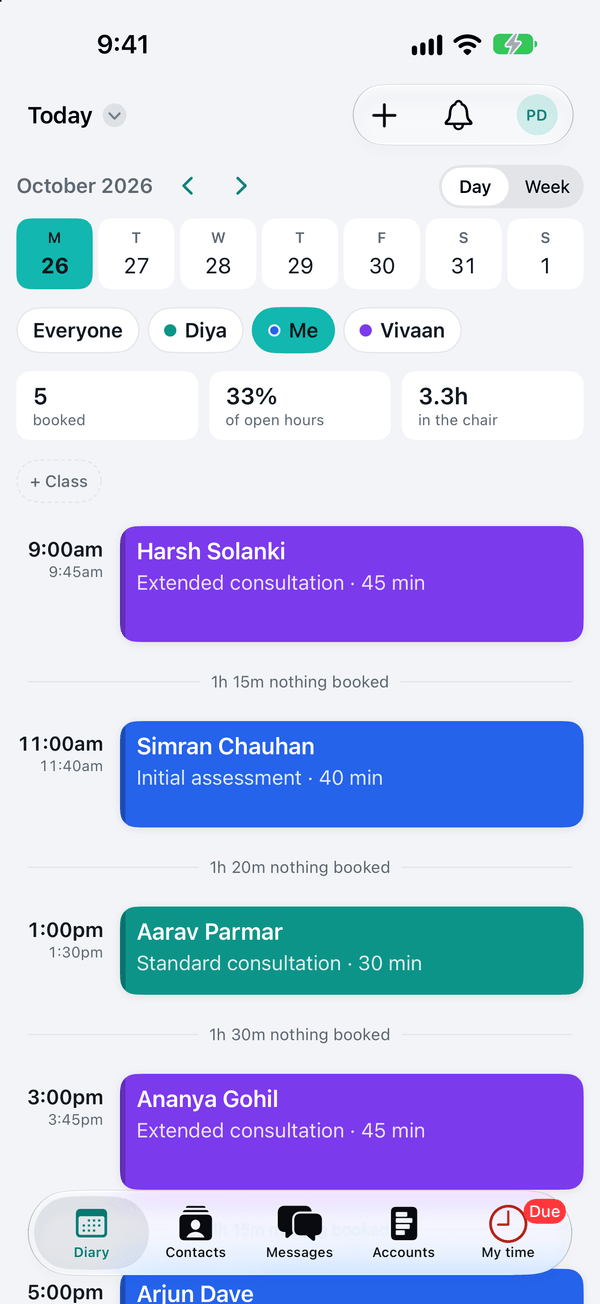
The app's diary: a physiotherapist's day, each appointment with its time, patient and visit type
The day's diary, for everyone or just you
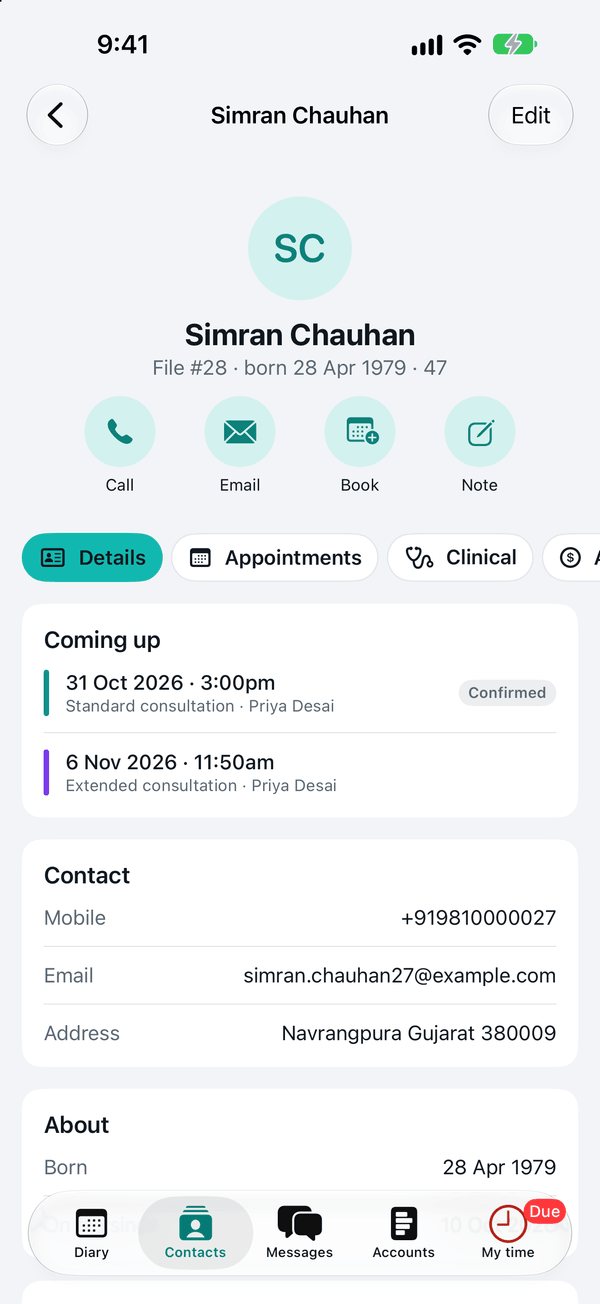
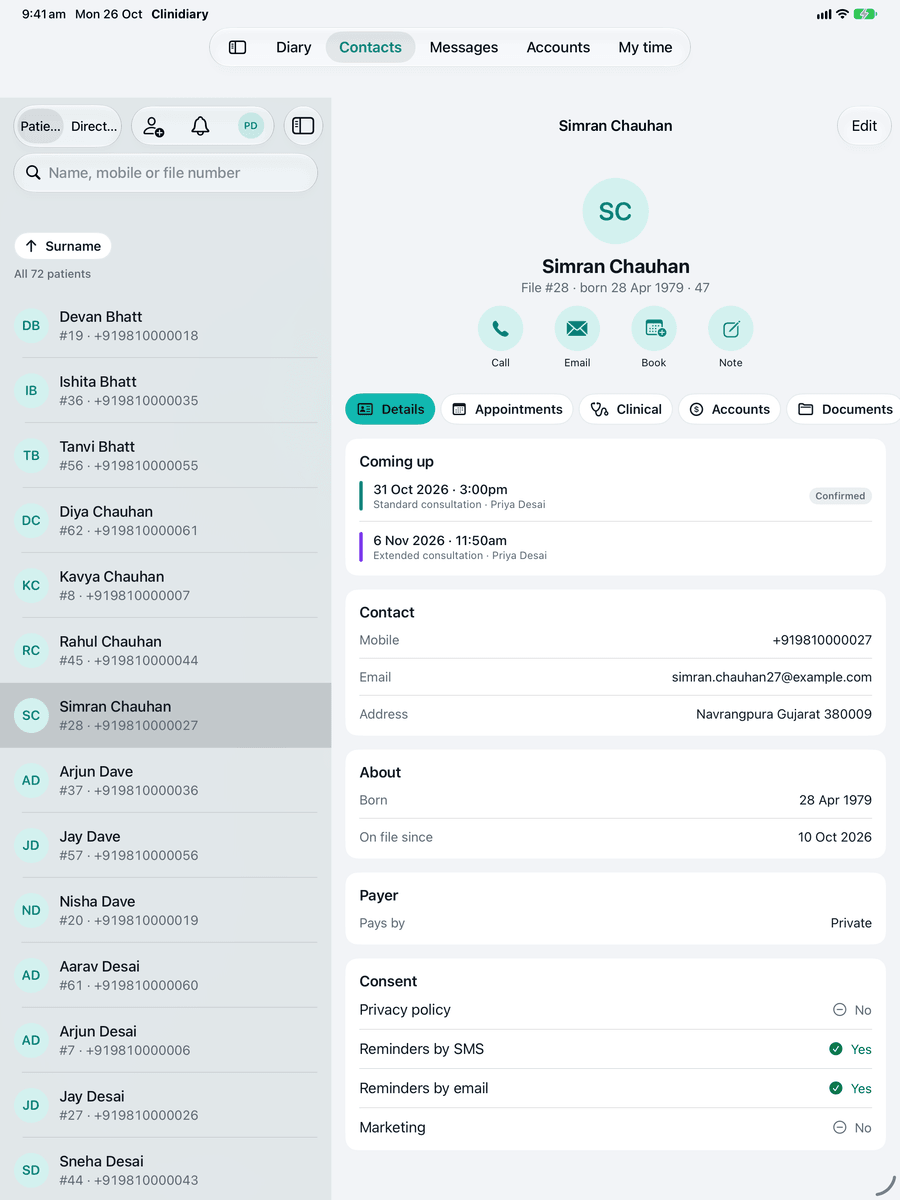
A patient's file in the app, with buttons to call, email, book and write a note, and their coming appointments
Each patient's file, with call, book and note
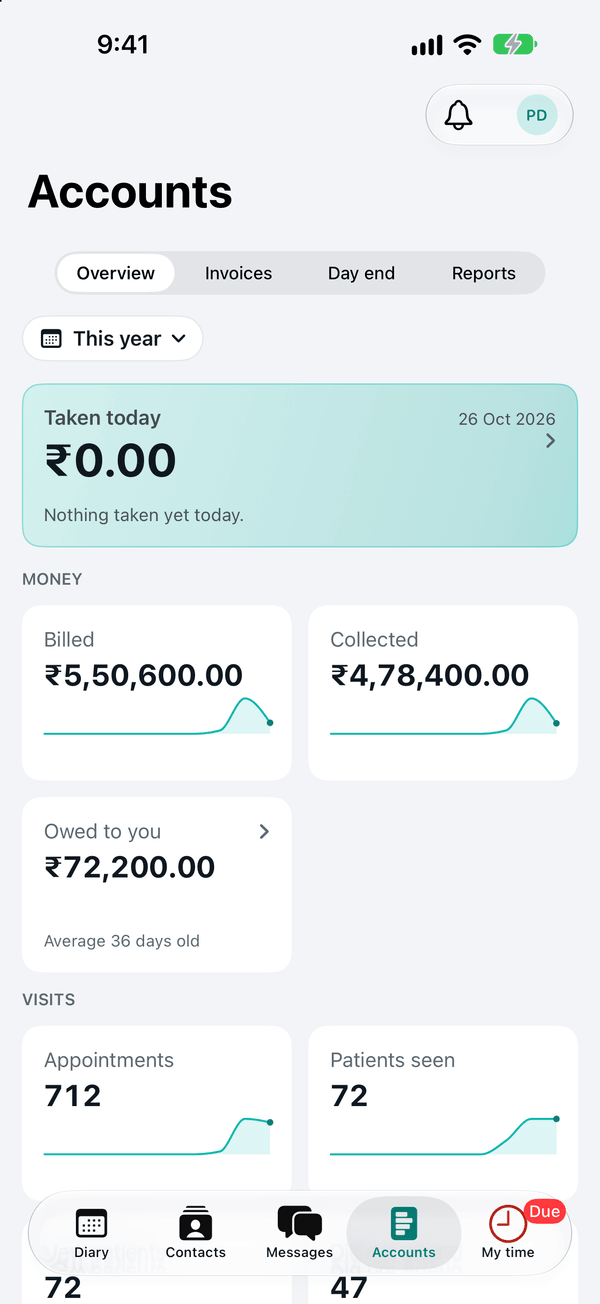
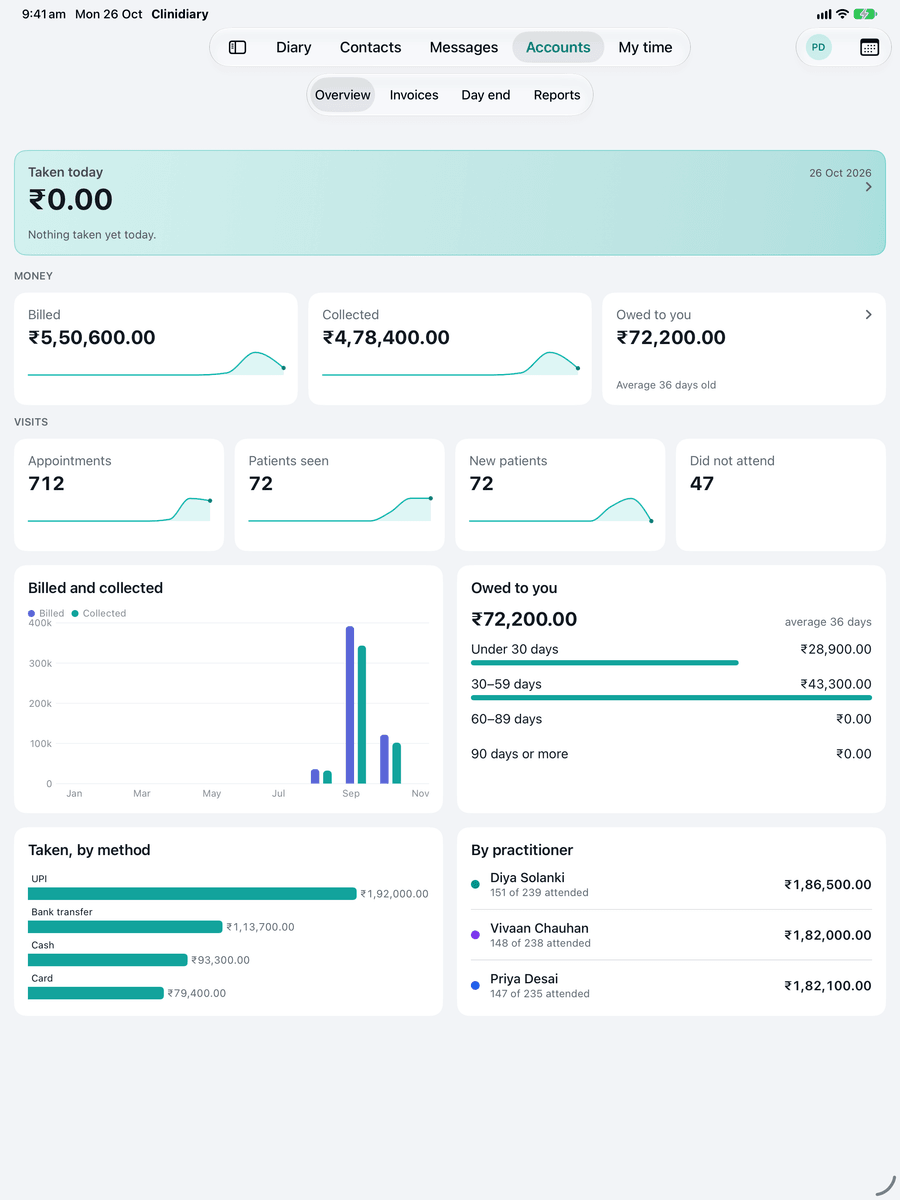
Accounts in the app: taken today, billed, collected and owed this year, with appointments and patients seen
Money billed, collected and owed
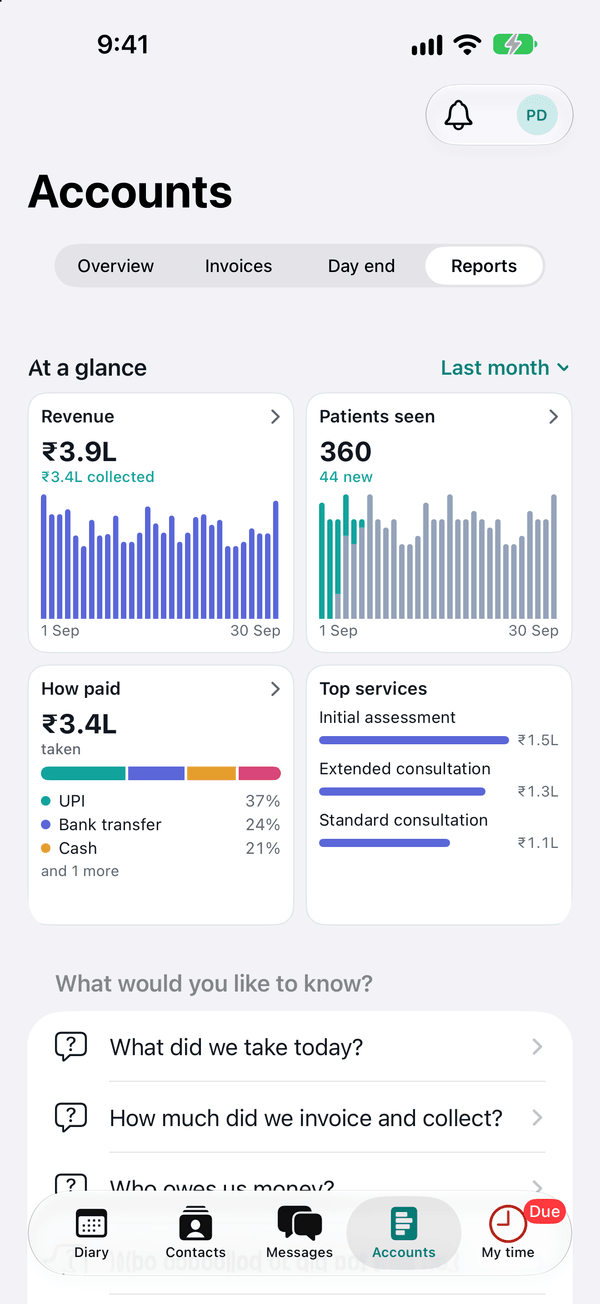
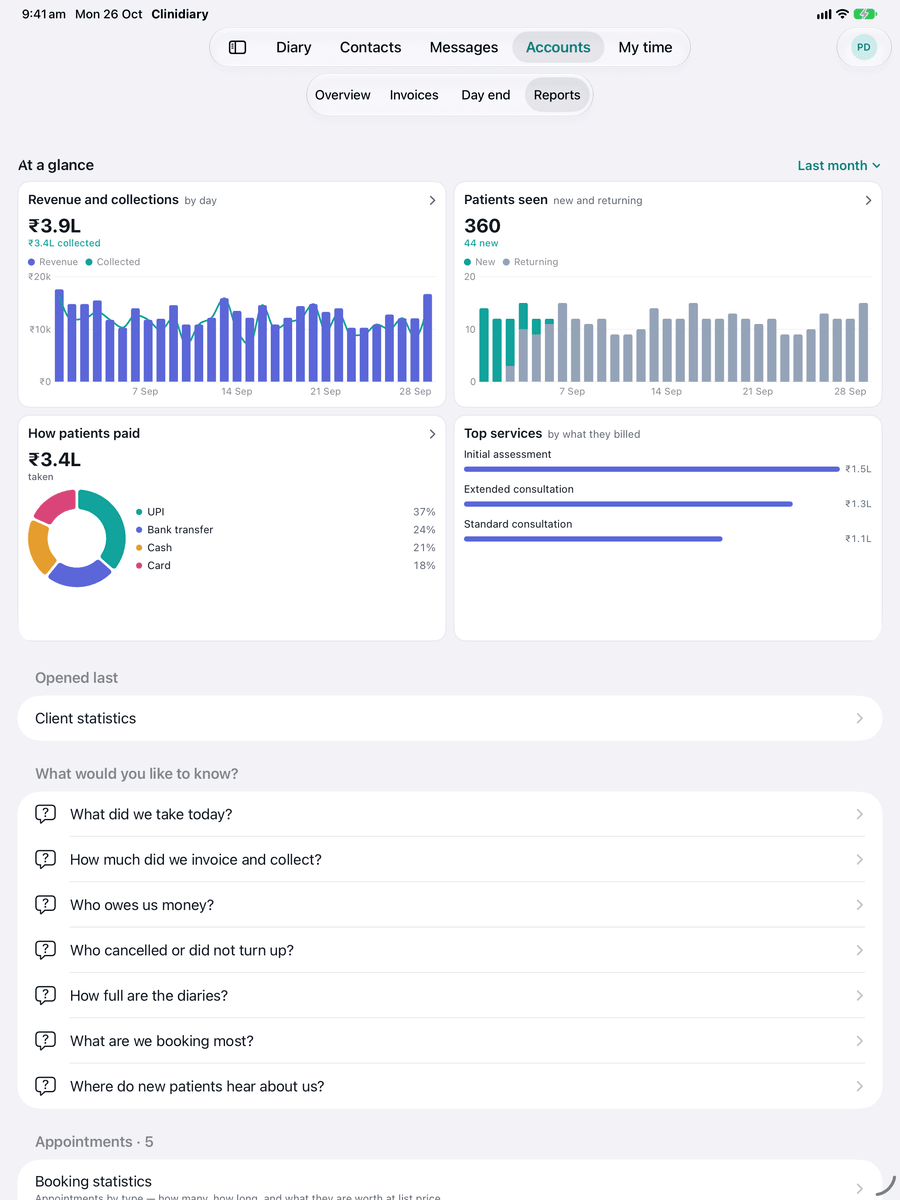
Reports in the app: last month at a glance, with revenue, patients seen, how patients paid and the top services
Last month at a glance
The staff room in the app: a front desk conversation between the team
Messages with your team
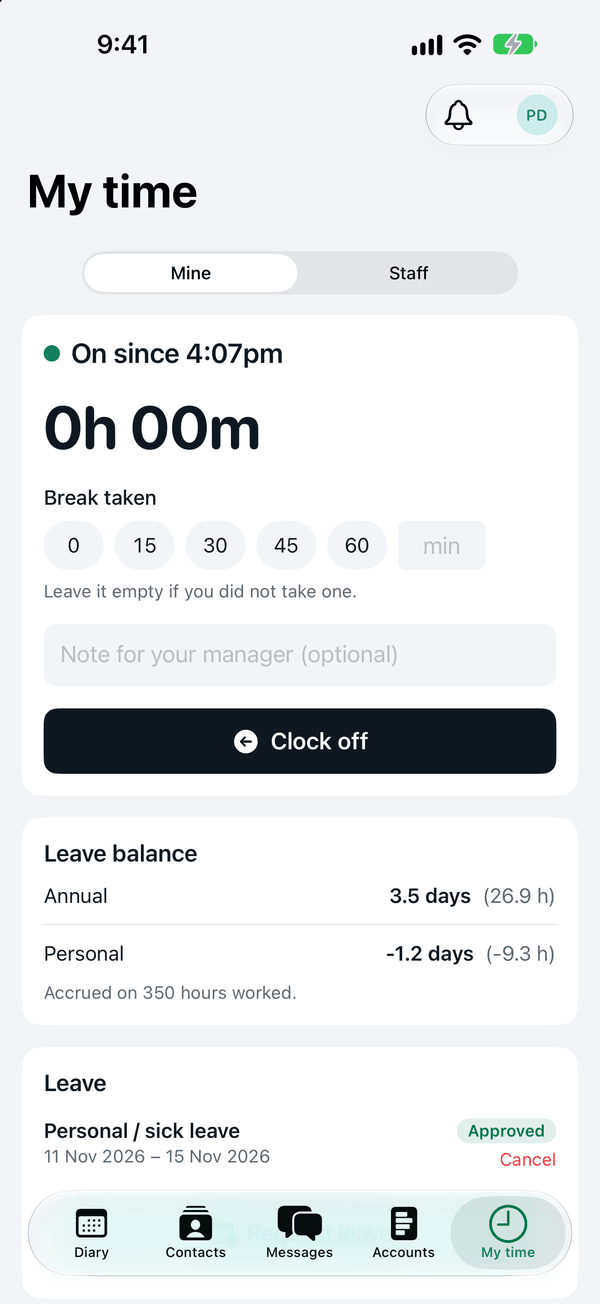
My time in the app: clocked on, a break, the leave balance and an approved leave request
Clock on and off, and ask for leave

Trusted by

  • UpPlus Physiotherapy
Support

Unlimited free support

Every clinic on Clinidiary gets free help, as often as it needs it, from the people who build it. The same generous help for every clinic, as often as you like. We set your clinic up with you, and help bring your patients across from your old system.

Talk to us
  • Live chat

    Straight to our team from any page, with an answer by email when we are with another clinic.

  • Email

    Write to us any time and a person replies.

  • Help centre

    Step-by-step guides for every part of Clinidiary.

Security and privacy

Your records are safe with Clinidiary

Clinics trust Clinidiary with their patients' records every day. Security is built into every screen, from the way you sign in to the trail every change leaves behind.

Encrypted, always

Every connection to Clinidiary is encrypted, on every device, wherever you sign in.

Passkeys and two-factor

Sign in with your phone’s fingerprint or face, or Windows Hello, or a password with a second code.

Locks itself

A screen left alone locks itself, so a shared computer keeps every patient's file private.

Each person sees their part

Reception, practitioners and accounts each see what their job needs. You decide who can open clinical notes.

A trail on every record

Who signed the note, who issued the bill, who changed it. Every clinical record is kept for good.

Your data stays yours

Patients, notes and invoices export whenever you like, in a click.

How Clinidiary protects records
FAQs

Frequently asked questions

I have never used practice software. Is it hard to start?
No. It starts as a diary: book your patients and that is the whole first day. Notes, bills and reminders are there when you want them, and it runs in the browser on your phone.
How do you keep patient information private?
Every connection is encrypted, sign-in can use passkeys or two-factor, screens lock themselves when left alone, each person sees only what their job needs, and every record keeps a trail of who did what.
Can it send reminders on WhatsApp?
Yes. Each day’s reminders are written for you, and one tap opens WhatsApp on your phone with the message ready to send.
Can patients book online?
Yes. Your clinic gets its own booking page: patients pick a service, a physiotherapist and a free time, and the booking lands straight in your diary.
Can I bring my patients across from my current software?
Yes. Settings has a data import, and we help with the export from the software you are leaving so the diary and the patient list arrive together.
Does it work on a phone or a tablet?
Yes. Every screen is laid out for a computer, a tablet held either way and a phone, so the diary and a patient’s notes are readable in the treatment room.

Clinidiary news & updates

See all news and updates
  • Improved

    Try the demo: classes, forms and a full diary

    A whole practice to click around in: a full diary, group classes with their rolls taken and paid, its own note template, and new patients’ forms waiting to be checked. Open it in one click.

    Take a look
  • Security

    Screens lock themselves on shared computers

    A clinic's screen now locks after 30 minutes left alone for anyone with a quick-unlock PIN, and everyone is signed out after 8 hours away. Owners can change both.

  • Improved

    Reports you can point at

    Hover over any chart in Reports to see the figure behind it, for any day and any practitioner.

Run your own week through it

Free for six months, the whole workspace, starting with just your email. Tell us what your clinic needs next, and we will build it with you.

Still comparing? Read our guides to physiotherapy software in India, the best clinic management software in 2026 what to ask before you buy, and how to run your physio clinic for just ₹250 a month.